
Why Homestyler in 2026?
Interior design has always had a democratisation problem. Professional tools like SketchUp, Revit, and AutoCAD require months of training and cost hundreds of dollars per year. Hiring a professional designer adds significant expense. And trying to visualise a room arrangement purely in your head — or by dragging real furniture across a real floor — is frustrating and imprecise. Homestyler was built to solve exactly this problem, and in 2026 it does so better than ever before.
The platform now serves over 18 million users across more than 200 countries, hosts over 38 million user-generated design cases, and — following its landmark appearance at NVIDIA GTC 2026 — has positioned itself as the world's first AI-native 3D home design platform. Whether you are a first-time homeowner planning a bedroom refresh, a professional designer building client presentations, or a furniture retailer looking to create digital showrooms, Homestyler meets you at your level of expertise. Design today, transform tomorrow.
Everything You Can Do on Homestyler: Full Product Overview
- 3D Floor Planner: draw rooms at accurate measurements, import CAD files or existing plans, and build multi-floor layouts — complete with walls, doors, windows, and structural elements.
- Furniture Catalogue (1M+ Models): real 3D models of real products from real brands — place, resize, recolour, and link directly to purchase pages so you can buy exactly what you designed with.
- AI Designer: generate multiple complete room concepts from a text prompt or reference image — no design experience needed.
- AI Modeler: photograph any piece of furniture in the real world and convert it instantly into a 3D model you can place in your design.
- Home Copilot: an AI assistant you talk to naturally — it refines layouts, suggests decor combinations, and navigates the design library on your behalf.
- AR Preview: hold up your phone and see any catalogue item appear at 1:1 scale in your actual room before purchasing.
- Cinema Rendering: export photorealistic 1K, 2K, and 4K images, panoramic 360-degree views, and video walkthroughs of completed spaces.
- Community & Design Challenges: a live feed of 38 million designs, 200+ annual challenges with prizes, and a marketplace of community-created models and templates.
Quick compare: 3D Floor Planner · AI Designer · Furniture Catalogue · AR Preview
Trend 1: The Floor Planner – Where Every Great Design Begins
Homestyler's floor planner is the foundation of every project on the platform — and it is far more capable than most users ever fully explore. At the basic level you draw rooms by placing walls at precise measurements and switch between 2D plan view and immersive 3D walkthrough with a single click. At the advanced level it supports multi-floor layouts, arc walls, custom ceiling heights, beams, plumbing and electrical plan overlays, parametric stairs, and automated roof construction. It covers the full scope of most residential design projects without ever needing specialist CAD software.
Three Ways to Start Your Floor Plan
- Draw from scratch: use the wall tool to trace your room's perimeter at numeric measurements. This is the most accurate method and takes 10–15 minutes for a standard room — giving you full control over every dimension.
- Import an existing plan: upload a CAD file or a floor plan image from an estate agent or developer and trace directly over it. This is the fastest starting method when you have a reliable reference document.
- Scan with your phone: Homestyler's mobile app maps your physical room using your phone's camera and generates an approximate floor plan. Measurements can be up to 2cm off — always verify manually before making final design decisions.
Start designing: Open Floor Planner Free, Browse Room Templates, Download Mobile App.
Trend 2: The Furniture Catalogue – Real Products, Real Brands, Real Purchases
The single most commercially astute decision in Homestyler's entire design is populating its library with accurate 3D models of actual products from real-world manufacturers. When you drag a sofa into your floor plan, you are not placing a generic placeholder — you are placing a specific model at its exact physical dimensions, in its available colour options, from a brand whose website you can visit to purchase that exact piece immediately. This turns every Homestyler design into a curated, actionable shopping list.
What Makes the Catalogue Stand Out
- Scale and breadth: over one million 3D models covering furniture, lighting, flooring, wall treatments, appliances, outdoor pieces, and decorative accessories — updated every week with new branded additions.
- Style range: Japandi minimalism, Scandi simplicity, Cottagecore warmth, Modern Bohemian, Luxury maximalism, Industrial raw, and dozens of other curated aesthetic directions with matching themed collections.
- Direct purchase links: click any branded item in your design summary and you go directly to its product page — the furniture you designed with becomes furniture you can order today.
- Premium expansion: Styler Membership unlocks over 50,000 additional premium models and 1,000+ ready-made room templates for instant project starts and professional-quality output.
Browse the catalogue: Living Room Furniture, Bedroom Collections, Kitchen & Dining.
Trend 3: AI Tools – Homestyler at NVIDIA GTC 2026
At NVIDIA GTC 2026 in San Jose — one of the most significant global AI conferences — Homestyler executives delivered a keynote revealing a suite of AI-powered design tools that redefine what the platform can do. Built using NVIDIA Omniverse, RTX rendering technology, NVIDIA Edify, and NIM microservices, these tools directly address the most persistent frustrations in home design: the blank canvas problem, the "I can't find exactly this piece" problem, and the expertise gap that separates an amateur idea from a professional result.
Home Copilot
An AI design assistant you speak to in plain language during the design process. Describe what you are trying to achieve — "a reading corner with warm lighting and built-in shelving in a Japandi style" — and Copilot refines your layout, suggests furniture combinations, and surfaces matching items from the design library in real time. It functions as a knowledgeable design partner, not a search bar.
AI Modeler
Photograph any furniture piece that inspires you — a chair in a coffee shop, a friend's sofa, something from a magazine spread — and AI Modeler converts that image into a fully customisable 3D model you can drop directly into your Homestyler design. This eliminates the most common frustration of every digital design tool: the inability to find the exact piece you have in mind.
AI Designer
Type a room description or upload a reference image and AI Designer generates multiple complete, fully styled room concepts in minutes. Each concept includes a furniture arrangement, colour palette, and material selection. No design expertise is required. Users can iterate on any concept, mix elements between directions, and refine the most promising result into a polished, purchasable final design.
Voice-to-Design
Demonstrated live at GTC 2026: speak a room description aloud — "Create a modern living room with beige tones and natural wood accents" — and Homestyler generates an instant 3D model. Voice interaction removes even the keyboard as a barrier to getting started with design.
Try the AI tools: AI Designer, AI Modeler, Home Copilot.
Trend 4: Cinema Rendering – From Rough Sketch to Photorealistic Image
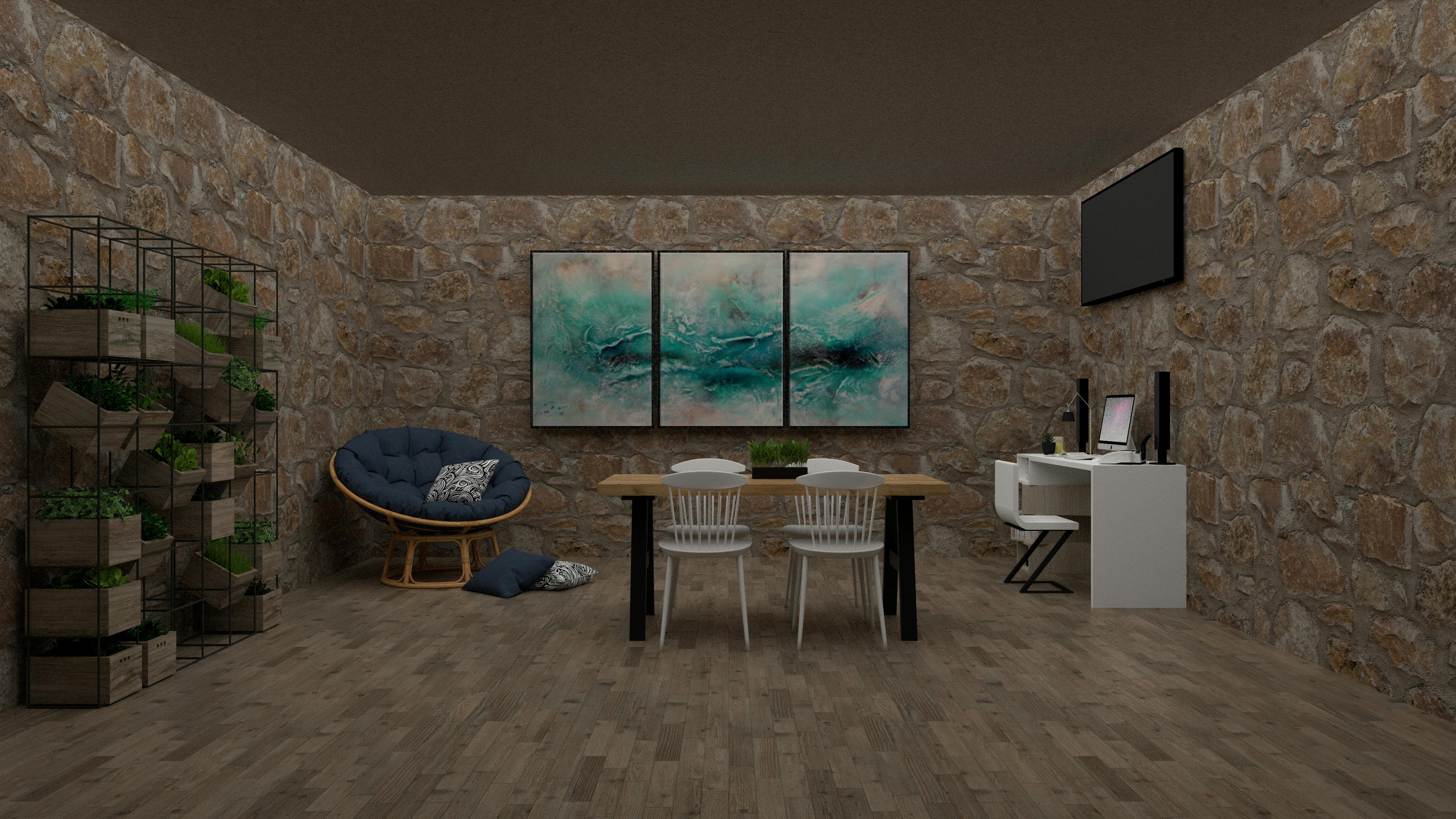
A design that cannot be convincingly visualised rarely becomes a room that gets built. Homestyler's rendering engine has evolved from producing passable preview images to generating work that professional designers present to clients without apology. The free Basic plan provides unlimited 1K renders — perfectly adequate for personal decision-making. Paid tiers unlock quality and format options that serve every need from casual social sharing to polished formal client proposals.
- 1K Standard Renders: unlimited on the free tier — ideal for personal projects, quick concept checks, and sharing with family or friends.
- 2K / 4K Cinema Renders: available on paid tiers — print-quality images with detailed material textures, accurate shadow behaviour, and photorealistic depth. These are the renders you send to clients.
- Panoramic 360° Views: interactive renders that recipients explore by dragging their phone or mouse — the most effective presentation format for clients who find flat images hard to interpret.
- Video Walkthroughs: animated tours of a completed design — invaluable for multi-room projects or any presentation where you want to guide a viewer through the space in a deliberate sequence.
- Lightmix: adjust individual light source positions, intensities, and colour temperatures after rendering without re-rendering the entire scene — a significant time-saver in any iterative professional workflow.
Explore rendering options: 4K Cinema Renders, Panoramic 360° Views, Pro Membership.
Trend 5: AR Preview – See It in Your Room Before You Buy It
Homestyler's mobile AR Preview is the feature that most clearly bridges the gap between digital design and a real purchase decision. Select any item from the catalogue, activate AR Preview, point your phone at the relevant area of your room, and the item appears overlaid on your live camera feed at its actual physical scale. Walk around it. Check that it clears the door. Try two different colour variants side by side. The rendering in AR mode is not as polished as a 4K still render, but it answers the question that matters most: does this thing actually fit and look right in this specific space under this specific light?
Used intelligently, AR Preview pays for itself immediately by preventing expensive mistakes. Anyone who has ever ordered a sofa online only to discover it is six inches too wide for the alcove it was meant to occupy will understand exactly what this feature is worth.
Try AR Preview: Download for iOS, Download for Android, AR Co-Design Feature.
Trend 6: The Community – 38 Million Designs and Growing
Homestyler's community layer transforms what might be a solitary creative activity into something collaborative, motivating, and genuinely educational. The platform hosts a live feed of user-submitted designs sortable by style, room type, and trending tag. Users can follow designers whose work they admire, like and comment on projects, share their own work publicly, and enter competitive design challenges. Over 200 challenges run every year, with prizes including full-year Styler Memberships, and standout contributors earn the coveted Designer of the Week recognition.
Tip for design inspiration: Before starting any project in an aesthetic you are less familiar with, spend 20 minutes browsing the community feed filtered by that style. With 38 million design cases available, it is the most comprehensive free reference library of what actually works in real rooms — curated by millions of designers at every level of expertise.
Join the community: Browse Designs, Design Challenges, Portfolio Membership.
Trend 7: Homestyler for Business – Retailers, Developers, and the Global Partner Program
Homestyler's fastest-growing segment is its B2B offering — and it represents the company's most commercially ambitious application of its technology. A furniture brand whose 3D models appear in the Homestyler catalogue gains passive visibility among 18 million active designers every time someone searches that product category. Real estate developers can present photorealistic furnished unit visualisations before construction completes. Hotel chains can design and iterate on guest room layouts using hospitality-specific furniture templates without physical mock-ups.
- Digital showrooms: Homestyler's NIM microservices can generate a photorealistic virtual store environment in as little as 48 hours — a compelling alternative to months of physical showroom planning.
- 3D panoramic product replacement: let customers swap any item in a room scene instantly, seeing any sofa in six colour variants without leaving the browser.
- Global Partner Program: launched at the Milan Furniture Fair in 2024, this program formalises B2B relationships and attracted over 30 committed global partners at its first major showcase.
- OpenUSD integration: ten times faster file conversion from AutoCAD and SketchUp formats — enabling seamless collaboration between Homestyler and professional architectural software.
Business solutions: Global Partner Program, Digital Showrooms, Real Estate Solutions.
Build Your Ideal Design Workflow in 8 Steps
A smart Homestyler workflow takes you from a blank room to a confident, shoppable, presentation-ready design with the least wasted effort. Follow this sequence and you will avoid the most common mistakes that first-time users make.
- Set accurate room dimensions — draw or import a precise floor plan before placing any furniture. Inaccurate measurements produce beautiful renders of rooms that do not reflect reality.
- Add fixed structural elements — doors, windows, built-ins, columns, and any features that constrain your layout before you start placing furniture.
- Use AI Designer for initial concept directions — generate 3–5 concepts from a brief before committing to manual design. Use the AI output as raw material to react to, not a finished result to accept.
- Furnish with real catalogue items at actual dimensions — choose pieces from brands whose products you can verify online and eventually buy.
- Apply materials, colours, and finishes — wall colours, flooring, and soft furnishings define a room's character at least as much as any individual piece of furniture does.
- Set up lighting deliberately — spend five minutes adjusting light positions, intensities, and colour temperatures. Default flat lighting is the single most common reason that renders look unconvincing.
- Render and review over time — generate a 1K render, live with the image for 24–48 hours, then refine before committing to cinema quality. Design choices that look perfect at midnight often reveal their flaws in morning light.
- Use AR Preview for final verification — confirm proportions and colours in your actual room before purchasing anything significant.
Example Workflows by Situation
- Homeowner renovating a bedroom: scan room with the mobile app → browse Japandi catalogue → AI Designer for concept directions → 1K render review → AR verify key pieces → purchase via catalogue links.
- Designer presenting to a client: import CAD plan → full manual furniture layout → 4K cinema render + panoramic 360° → portfolio showcase → client feedback session → revision round.
- Furniture retailer building a digital showroom: brand catalogue integration → room template library → virtual store generation → direct purchase link activation → visibility to 18M active users.
- Real estate developer marketing a development: multi-unit floor plans → multiple furnished layout variants per unit → panoramic tour per variant → embed in property listing → prospect walkthrough on any device.
Quick compare: Open Homestyler Free · Pro Membership · Business Solutions
Things to Watch Out For: Limitations, Free Tier, and Browser Support
- Browser dependency: Homestyler is optimised for Google Chrome. Firefox works with a performance warning on the 3D tools; Safari on iOS restricts users to touch controls rather than the full interface. For the complete feature set, Chrome is the only fully reliable choice.
- Free tier AI credits: the Basic plan includes just 3 total AI credits. The most powerful features — AI Designer, AI Modeler, and Copilot — are accessible to try but require a paid membership for regular use.
- Watermark on free exports: all renders from the Basic plan carry a Homestyler watermark. Paid tiers remove it entirely — essential for any professional use.
- Performance on complex scenes: large multi-floor projects with many high-detail 3D models can trigger lag or crashes on older hardware. Splitting large projects by floor or zone mitigates this effectively.
- Room scan accuracy: the mobile room scanning tool is useful but not survey-grade — margins of up to 2cm are acknowledged by Homestyler. Always verify key measurements manually before finalising any design.
Frequently Asked Questions (FAQ): Homestyler 2026
Is Homestyler really free to use?
Yes — the Basic plan is permanently free with no time limit. It includes unlimited 1K renders, the full floor planner including multi-floor support, access to the core furniture catalogue, community access, and the ability to publish designs publicly. The main limitations are the Homestyler watermark on all rendered exports and a total of just 3 AI credits. Paid tiers remove the watermark and unlock cinema-quality rendering and monthly AI credit allocations.
How does AI Designer work?
Type a room description — style, mood, constraints, specific requirements — or upload a reference image, and AI Designer generates multiple complete room concepts in minutes. Each concept includes a furniture arrangement, colour palette, and material selection. You can then edit any individual element, mix features between concepts, and refine the most promising direction into a polished final design. Each generation consumes AI credits from your allocation.
Can I use Homestyler on my phone or tablet?
Yes. Homestyler is available as a free app on both iOS (App Store) and Android (Google Play). The app supports the full design workflow, AR furniture preview at 1:1 scale in your actual room, room scanning to generate floor plans, community browsing, and full design challenge participation. For complex multi-floor projects, the browser version on a desktop remains more capable — but the mobile app has seen substantial feature additions throughout 2024 and 2026.
Which browser works best with Homestyler?
Google Chrome is the only browser Homestyler fully recommends and optimises for. The platform runs on Firefox with a warning about imperfect 3D tool performance, and has significant limitations in Safari on iOS. For the full AI feature set, all rendering options, and smooth 3D performance throughout — install Chrome before starting any serious design project.
Can I buy the furniture directly through Homestyler?
Many branded items in the catalogue include direct purchase links. Open the summary view of your design, click any catalogued item, and you may be taken directly to that product on the brand's website to order it. This turns your completed Homestyler design into a curated, one-click shopping list — one of the most practically useful features on the entire platform.
Is Homestyler suitable for professional interior designers?
Increasingly yes. Paid tiers unlock 4K cinema renders, panoramic 360-degree views, and video walkthroughs appropriate for formal client presentations. Portfolio Membership allows designers to list their services on the platform and attract leads from Homestyler's 18 million global users. AI tools compress the concept phase dramatically. Multi-floor support and advanced structural tools cover the vast majority of residential projects. For highly specialised architectural work requiring engineering-grade precision, dedicated CAD tools remain more appropriate.
What is the Global Partner Program?
Launched at the Milan Furniture Fair in 2024, Homestyler's Global Partner Program formalises B2B relationships with furniture manufacturers, retailers, design agencies, real estate developers, and software integrators. Partners gain dedicated technical support, enterprise feature access, product catalogue integration (giving their items visibility to 18 million active users), and co-marketing opportunities with a genuinely global platform.
How do I transfer my designs between the app and the browser?
Homestyler is entirely cloud-based — all your designs are stored online and accessible from any device where you are signed into your account. Start a project on the desktop browser, continue it on the mobile app, and pick it back up on the browser without any file transfers or manual syncing required. Changes made on any device are reflected everywhere automatically.
Conclusion
Homestyler in 2026 is the most capable, most accessible, and most ambitiously conceived home design platform ever built for a mass market. Starting from an Autodesk prototype developed in 2009, completely rebuilt by Alibaba and Easyhome after their 2016 acquisition, and now presenting AI tools at NVIDIA's flagship global conference, the platform has completed a remarkable journey from useful curiosity to genuine industry infrastructure.
For homeowners it eliminates guesswork from renovation decisions. For designers it accelerates concept work and elevates the quality of client presentations. For retailers and developers it provides digital transformation tools the home furnishing industry has long needed. The free entry point removes every financial barrier to starting. The AI tools unveiled at NVIDIA GTC 2026 remove most expertise barriers. What remains is simply the time to learn the platform properly — and this guide has given you exactly the map you need to do that.
Ready to start designing? Begin with the tools that make the biggest difference: 3D Floor Planner, AI Designer, Furniture Catalogue, AR Room Preview.